> For the complete documentation index, see [llms.txt](https://docs.voltage.finance/voltage/llms.txt). Markdown versions of documentation pages are available by appending `.md` to page URLs; this page is available as [Markdown](https://docs.voltage.finance/voltage/the-platform/liquidity-pools/boosted-pool-rewards.md).
# Boosted Pool Rewards
Voltage Finance integrated [MERKL](https://merkl.angle.money/?search=voltage) within our DEX UI and introduced a new [**“Boosted Reward**](https://voltage.finance/pool?filter=boosted_rewards)**”** tab on the Pools page. This feature offers users an enhanced opportunity to earn additional rewards by providing liquidity to [specific v3 pools.](https://voltage.finance/pool?filter=v3)
### **Here is how you will Benefit**
By participating in the boosted pools, users can earn trading fees along with additional rewards. This dual incentive structure ensures that liquidity providers are well-compensated for their participation.
The integration simplifies the process of adding liquidity. Users can now directly provide liquidity to boosted pools on Voltage’s user-friendly interface. This seamless integration means users will not need to navigate multiple platforms to maximize your earnings.
## **Here is how you can get started on Voltage’s Boosted v3 Pools**
1. **Navigate to the Pool page:** navigate to the Earn tab and click on the “[Pools](https://voltage.finance/pool?filter=v3)” button to view all available liquidity pools.
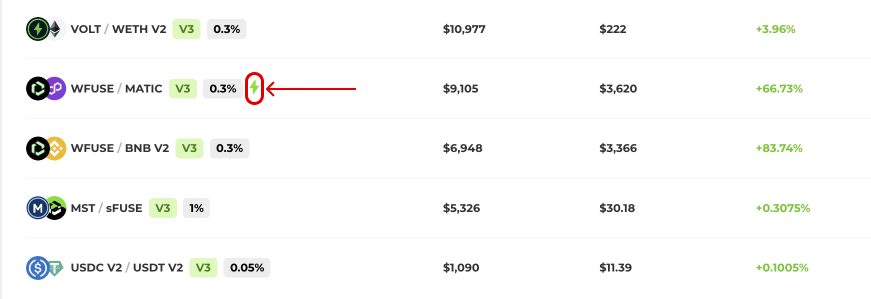
2. **Identify Boosted Pools:** Look for pools marked with a small green Voltage logo, indicating they are part of the boosted rewards program and connect your wallet (hover the mouse over the lighting there is a message of boosted rewards).
### **Providing Liquidity:**
1. **Select a Pool:** Choose from the available boosted pools, which are currently offering enhanced rewards.
2. **Add Liquidity:** Follow the on-screen instructions to add your liquidity to the selected pool. Ensure you have the necessary tokens in your wallet.
3. **Confirm Transaction:** Confirm the transaction in your wallet to start providing liquidity and earning rewards.
{% embed url="" %}
### **Managing Rewards:**
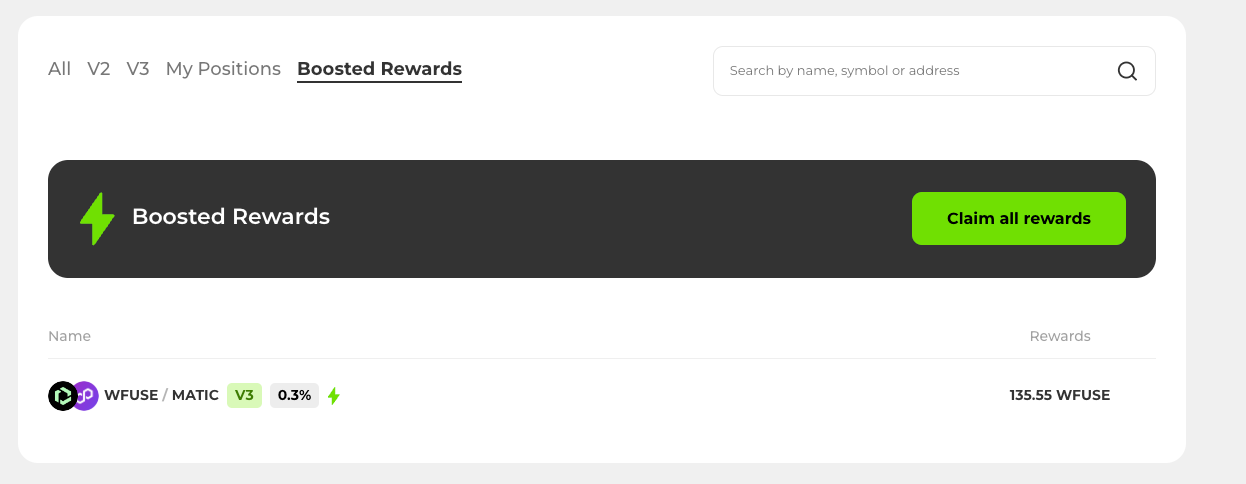
1. **View Positions:** To see your active positions, click on the “Boosted Pools” tab on the Pool page.
2. **Claim Rewards:** Click on the “Claim Rewards” button to transfer your earnings to your wallet. If you provide liquidity to multiple boosted pools, it will claim all accrued rewards on all of them automatically.
{% hint style="danger" %}
For an LP to get rewards it needs to be **at least \~0.01%** of the pool
{% endhint %}
{% embed url="" %}
{% hint style="info" %}
**Note 1:** You have to claim rewards from accrued trading fees on the v3 pool separately on the pool page.
**Note 2:** Although a campaign ended, it might take a few hours to claim the rewards because MERKL updates their script every 8 hours.
{% endhint %}
{% hint style="info" %}
[MERL documentation](https://docs.merkle.io/)
{% endhint %}